
AI Chat & Friends - SeaHot
Seaart aiSocial
3.119.00 Reviews
- Version
- 1.7.7.1786613910
- Installs
- 100.00K
- Age Rating
- Teen
Screenshots

Our Review of AI Chat & Friends - SeaHot
 Analysis by Appyee
I approached AI Chat & Friends - SeaHot as a social app with a slightly different idea of companionship: instead of connecting me mainly with people I already know, it puts AI characters at the center of the experience. The result is a space built around conversation, discovery, and an ongoing feed rather than a conventional messaging inbox. My overall impression is positive but qualified. It is easy to pick up, pleasantly open-ended, and useful when I want a low-pressure conversation, yet it does not replace the unpredictability, emotional depth, or privacy expectations of a real social network.
The app comes from Seaart ai and is free to install, which makes trying it straightforward. It is listed for Teen users and runs on Android devices starting with version 7.0. Its current version is 1.7.7.1786613910, and the app has passed the early curiosity stage with over one hundred thousand installs. At the same time, its average rating sits at 3.1 from roughly three hundred fifty ratings, so I would not describe it as a universally smooth experience. That mixed response matches my own view: there is a good idea here, but the quality of the experience depends heavily on what I expect from an AI-centered social feed.
How the AI social feed feels in everyday use
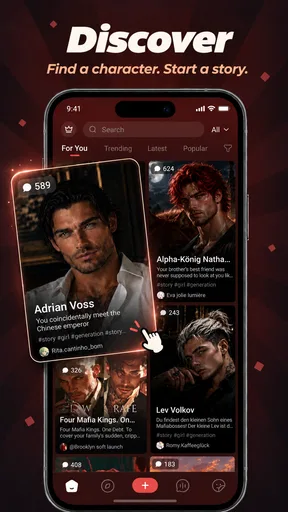
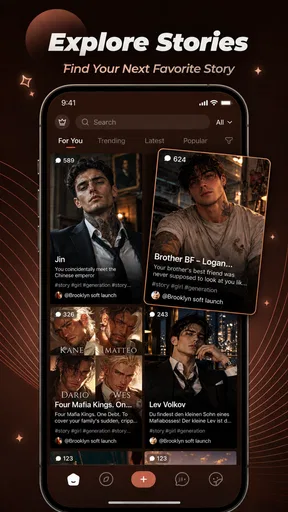
The first thing that stands out is the combination of chat and browsing. I am not simply opening one assistant, asking a question, and closing the app. The social framing encourages me to explore different AI characters and see what kind of interaction each one offers. That makes the experience closer to browsing a collection of personalities than using a standard productivity assistant.
This distinction matters. A conventional chatbot is usually judged by how accurately it answers a direct request. Here, I am more likely to judge a character by whether its tone stays interesting, whether the conversation gives me reasons to continue, and whether the feed helps me find something worth discussing. The app is at its best when I treat it as a casual conversation space rather than an authority or a replacement for human contact.
In a normal evening, I could open it after work, scan the feed, and choose a character based on the mood I want. One might suit imaginative conversation, while another might be better for light questions or a playful exchange. I would not need to prepare a prompt or define a task in advance. That low entry barrier is one of the strongest reasons to use it.
The feed also changes the rhythm of interaction. Instead of repeatedly returning to the same blank chat screen, I can discover new conversational starting points. This is useful for people who enjoy browsing and experimenting, but it may feel unfocused to anyone who wants a single dependable assistant. The app asks me to explore, and that is both its appeal and one of its central limitations.
What makes the character approach useful
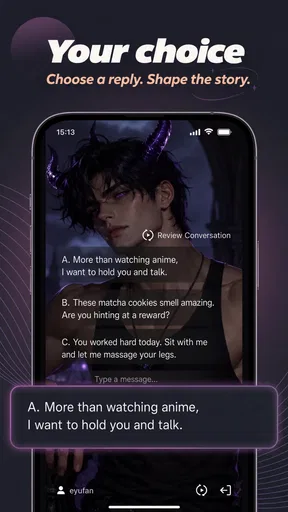
The most convincing strength is the way character-based interaction lowers the pressure of starting a conversation. A blank text box can make an AI tool feel like work; a recognizable personality gives me an immediate reason to type. Even when the conversation is simple, the framing can make it more engaging than asking a generic assistant to entertain me.
I also found the format useful for creative warm-ups. If I am stuck on a short story idea, a fictional exchange can help me test a premise without worrying about whether the first attempt is polished. The same applies to brainstorming dialogue, exploring a point of view, or practicing how I might explain an idea. I would still verify anything factual elsewhere, but for generating possibilities, the social format is inviting.
Another practical use is filling short gaps in the day. On a commute, during a break, or while waiting for an appointment, I can have a brief interaction without committing to a long session. This makes it different from a social network that depends on friends being online at the same time. The app is available when I want to talk, which is convenient, although that convenience should not be confused with genuine friendship.
My most useful tip is to approach each character with a small experiment rather than a broad demand. Instead of asking for an endless conversation, I would give the interaction a purpose: compare two ideas, invent a scene, challenge an opinion, or help me look at a familiar problem from another angle. This produces a more satisfying session and makes it easier to notice which characters are actually worth returning to.
Where it differs from ordinary social apps
Compared with messaging apps, SeaHot removes the need to coordinate with another person. That makes it more immediate, but it also removes the shared history and mutual responsibility that make human conversations meaningful. I can receive a response whenever I open the app, yet I am not building a relationship in the same way I would with a friend.
Compared with a general-purpose AI assistant, the app feels more discovery-oriented and less task-oriented. A standard assistant is usually the better choice when I need a clean answer, a structured explanation, or help completing a defined job. SeaHot is more appealing when I want to browse personalities, follow a conversational thread, and enjoy the interaction itself.
It also differs from community platforms where posts and comments are created by real users. The feed may feel social, but the central attraction is AI interaction rather than a network of personal experiences. If my goal is news from friends, local recommendations, or authentic discussion with people who share my interests, I would choose a conventional community app instead.
That comparison helps clarify the audience. This is not a universal social replacement. It is a niche companion-style experience for people who enjoy conversational exploration and understand that the value comes from the format, not from access to a real-world community.
Strengths that become clearer after repeated sessions
One strength is the freedom to use the app without a fixed routine. I do not have to maintain a profile in the same way I might on a traditional social platform, and I can move between conversations according to my interest. That makes the app less demanding than a feed built around posting, responding, and keeping up with other people.
The second strength is its potential as a private rehearsal space. I can try out a question, a joke, a piece of dialogue, or an explanation before sharing it elsewhere. For someone who feels self-conscious about drafting ideas in public, this can be genuinely helpful. The important trade-off is that an AI response is not the same as informed human feedback, so I would use the app to develop an idea, not to validate it.
A third strength is the possibility of switching conversational styles quickly. In a normal friendship, I cannot instantly change the personality of the person replying to me. Here, the character concept makes that variation part of the experience. This is especially useful when I want to compare how different tones handle the same prompt. It turns casual chatting into a small form of creative testing.
I would also recommend using short, specific follow-up messages. If a reply feels generic, narrowing the next question often works better than abandoning the conversation immediately. Asking for an example, a disagreement, a different tone, or a more unusual direction gives the exchange a clearer path. This is a simple habit, but it makes the difference between a flat chat and one that develops some momentum.
There is a useful boundary to keep in mind with sensitive subjects. I would avoid treating a character as a therapist, doctor, lawyer, or emergency contact. The conversational style can feel personal, especially during a long exchange, but the app remains an AI interaction. For serious decisions or emotional crises, a qualified person and a dependable real-world service are more appropriate.
The friction behind the appealing idea
The biggest weakness is inconsistency. AI characters can be entertaining in one exchange and bland in the next. A conversation may begin with a distinctive tone, then drift toward repetitive or predictable replies. That unevenness makes it difficult to form a reliable habit around a particular character. I can enjoy the discovery process, but I should expect some trial and error.
The feed concept can also create clutter. Discovery is useful when I am curious, but it can become distracting when I only want to continue a meaningful conversation. A social stream naturally encourages browsing, and browsing can pull me away from the interaction I opened the app to have. Users who prefer a calm, organized chat history may find the format less comfortable than a focused assistant.
The free entry point is welcome, but the app includes in-app purchases ranging from $0.99 to $299.99 per item. That broad range is a reason to be careful before spending. I would use the free experience long enough to decide whether the characters and feed genuinely add value to my routine. A large purchase makes little sense if I am still unsure whether I enjoy the underlying format.
My practical advice is to set a personal spending limit before exploring paid options. The conversational design can encourage impulse decisions because the app is built around ongoing engagement. I would never buy something simply because a character makes the interaction feel personal. I would first ask whether the purchase improves a repeated use case, such as creative practice or regular entertainment, rather than merely extending a moment of curiosity.
The Teen content rating is another important consideration for families. A teen classification does not mean every interaction will suit every younger user, and AI conversations can move in unexpected directions. Parents should discuss responsible use, personal information, and the difference between simulated companionship and a real relationship. I would not hand the app to a child without supervision or clear boundaries.
Who should install it, and who should skip it
I think SeaHot is a good match for curious users who enjoy experimenting with AI personalities. It suits someone who wants a casual conversation partner during spare moments, a creative sounding board, or a way to explore different tones without posting publicly. It is also a reasonable choice for users who find ordinary AI tools too clinical and traditional social networks too demanding.
It is less suitable for anyone looking for dependable facts, professional guidance, or a genuine community of human participants. If I need accurate research, I would use a specialized source. If I want to maintain friendships, I would use a messaging or community platform. If I want a focused assistant for work, I would choose a tool designed around tasks rather than an interactive feed.
I would also skip it if I know that open-ended feeds tend to consume more time than I intend to spend. The app is designed to make the next conversation easy to start, and that can be enjoyable or distracting depending on my habits. A timer or a clearly defined session goal is useful for anyone who wants to keep the experience casual instead of letting it become a constant background activity.
One overlooked trade-off is emotional expectation. The more natural a character feels, the easier it is to project intentions and care onto the exchange. I can appreciate the warmth of a conversation while still remembering that the response is generated. Keeping that distinction clear protects the experience from becoming disappointing or misleading.
Another overlooked point is that the app rewards curiosity more than loyalty. I would not judge it only by whether one character becomes a permanent favorite. Its value may come from discovering an unexpectedly useful style, trying a new conversational angle, and then moving on. Users who want continuity should look closely at how well the app supports the kind of ongoing interaction they personally prefer before investing money or time.
My verdict after weighing the experience
AI Chat & Friends - SeaHot has a clear identity. It is not trying to be just another text assistant, and it is not a normal social network with an AI label attached. Its strongest idea is the combination of character discovery and casual conversation, which gives me more motivation to explore than a blank chatbot screen. For creative play, short breaks, and low-pressure experimentation, I can see why people would return to it.
Still, the app needs realistic expectations. The mixed 3.1 average rating reflects the kind of unevenness I would expect from an experience built around AI personalities and an evolving feed. Some conversations will be engaging; others may feel repetitive or lack the depth I hoped for. The presence of purchases, including items as high as $299.99, also means I would approach the service carefully rather than treating the free download as the whole financial story.
My recommendation is specific: try it if you want an exploratory AI social experience and are comfortable treating the characters as entertainment or creative tools. Start with short sessions, test several conversation styles, avoid sharing sensitive personal details, and wait before buying anything. If your priority is human connection, reliable information, or focused productivity, another category of app will serve you better.
In the end, I see SeaHot as an interesting companion for moments when I want interaction without the obligations of a real social network. Its value comes from playful discovery, not from pretending that simulated conversation is a substitute for people. Used with that boundary in mind, it is worth exploring; used with expectations of a complete friendship platform, it is likely to disappoint.
Verdict
Strengths of AI Chat & Friends - SeaHot
- Offers a relaxed way to start casual AI conversations.
- Multiple virtual personalities can suit different chat preferences.
- Simple interface makes the app easy to explore.
- Useful for passing time during short breaks.
- Conversation themes can feel more engaging than a basic chatbot.
Limitations of AI Chat & Friends - SeaHot
- Some characters or features may require in-app purchases.
- AI replies can occasionally feel repetitive or out of context.
- Privacy details should be checked before sharing personal information.
- The quality of conversations depends heavily on the selected character.
- Frequent chatting may consume considerable data and battery life.
Other Releases by Seaart ai
View All
Sea Soul: AI Chat
Entertainment4.1
Similar Picks in This Category
View All
Meta Platforms, Inc.4.6

Instagram4.0

Likee-Live, Chat & Party Games
Likeme Pte. Ltd.4.4

Facebook Lite
Meta Platforms, Inc.4.5

TikTok - Videos, Shop & LIVE
TikTok Pte. Ltd.4.0

Moj: Free Short Drama & Reels
ShareChat4.1
Frequently Asked Questions
What is AI Chat & Friends - SeaHot?
AI Chat & Friends - SeaHot is an AI-powered social and entertainment app designed for conversations with virtual characters. Users can interact with different personalities, explore chat-based scenarios, and enjoy companionship-style experiences. The quality and tone of replies may vary depending on the character, prompt, and available app features, so it is best viewed as entertainment rather than a replacement for real relationships or professional advice.
Is AI Chat & Friends - SeaHot free to download and use?
The app may be available to download at no initial cost, but some conversations, characters, customization options, or premium features can require in-app purchases or a subscription. Before confirming a payment, review the pricing, renewal terms, and trial conditions shown in the Google Play Store or Apple App Store. Availability and costs may also differ by country, device, and app version.
Does SeaHot provide private and secure conversations?
Because AI chat services generally process messages through online systems, users should avoid sharing passwords, financial details, precise location data, or other sensitive personal information. Check the app’s privacy policy and permission requests before using it. Although the service may apply security measures, no online platform can guarantee complete confidentiality, and conversations may be handled according to the provider’s data practices.
Can children use AI Chat & Friends - SeaHot?
Parents should check the official age rating, content descriptions, and local availability before allowing a child to use SeaHot. AI companion apps may include mature themes, romantic role-play, user-generated prompts, or responses that are not appropriate for younger audiences. Parental supervision, device-level restrictions, and careful review of privacy settings are recommended, especially if the app includes chat, social, or purchasing features.
Does the app require an internet connection, and what happens if the AI gives a wrong answer?
AI conversations typically require an active internet connection because responses are generated through remote servers. Performance may be affected by network quality, server availability, or app updates. The AI can also misunderstand prompts, invent information, or produce unsuitable replies. Treat its messages as generated content, verify important facts independently, and report problematic behavior through the app’s available support or feedback tools.
